Info: Es gibt eine neue Version von diesem Script.
Mit diesem kleinen Script ist es möglich eine beliebige Projekteigenschaft auszulesen. Es wird direkt auf die ProjectInfo.xml zugegriffen (ohne Umwege von Beschriftungen).
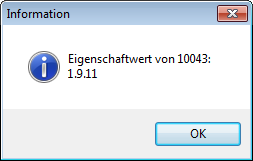
Anbei ein Beispielscript um die EPLAN-Version auszulesen.
Beispieltoolbar einfach importieren (Script davor laden).

Update 2015-02-10
Thomas Bald war so nett und hat ein Update geschrieben um die Eigenschaften in einer angegebenen Sprache zu erhalten.
Zusätzlich ist es möglich den Projektnamen bzw. Projektpfad zu erhalten.
ProjectInfo_V1.1
// Name                     : ProjectInfo.cs
// Version                  : V1.1
// Datum                    : 29.01.2015
// Autor                    : Thomas Bald
//                          :
// Thema                    : Liefert Informationen über das ausgewählte Eplan-Projekt
//                          :
// Letzte Änderung          : Multilanguage-Unterstützung in "ActGetProjectProperty"
//                          :
// ToDo                     : -
//                          :
// Benötigte Actions        : -
//                          :
// Bereitgestellte Actions  : ActGetProjectProperty
//                          :   Übergabeparameter ACC:  integer intPropertyID (die ID der gewünschten Projekteinstellung)
//                          :                           string strLanguage (Sprachkennung, wie z.B. "en_US" oder "all")
//                          :   Rückgabewert:           bool (true=OK / false=Fehler)
//                          :   Rückgabe ACC:           string strProjectProperty
//                          :
//                          : ActGetProject
//                          :   Übergabeparameter:      -
//                          :   Rückgabewert:           bool (true=OK / false=Fehler)
//                          :   Rückgabe ACC:           string strProject
//                          :
//                          : ActGetProjectName
//                          :   Übergabeparameter:      -
//                          :   Rückgabewert:           bool (true=OK / false=Fehler)
//                          :   Rückgabe ACC:           string strProjectName
//                          :


using Eplan.EplApi.Base;
using Eplan.EplApi.ApplicationFramework;
using Eplan.EplApi.Scripting;
using System;
using System.IO;
using System.Xml;
using System.Windows.Forms;
using System.Text.RegularExpressions;


public class ProjectInfo
{
    // ------------------------- //
    // Aufrufbare Eplan-Actions: //
    // ------------------------- //

    [DeclareAction("ActGetProjectProperty")]
    // Ermitteln einer Projekteinstellung anhand seiner ID und Rückgabe über einen ActionCallingContext
    // Der Quellcode basiert teilweise auf dem Script "GetProjectProperty" von Johann Weiher.
    // Als Parameter "intPropertyID" muß die ID der gesuchten Projekteigenschaft übergeben werden.
    // Die gesuchte Sprache wird als weiterer Parameter "strLanguage" übergeben (z.B. en_US oder zh_CN...).
    // Soll der komplette MultiLanguageString zurückgegeben werden, muss "all" übergeben werden.
    // Rückgabewerte: true bei Erfolg, false bei Fehler
    // Rückgabe als ActionCallingContext: strProjectproperty (enthält die gesuchte Projekteigenschaft)
    // Bei auftretenden Fehlern werden Meldungs-Dialoge angezeigt.
    //
    // Beispielaufruf als Eplan-Action:
    // ActionCallingContext objACC = new ActionCallingContext();
    // objACC.AddParameter("intPropertyID", "10011");  //<=hier den integer-Wert als string übergeben
    // objACC.AddParameter("strLanguage", "de_DE");
    // bool bolException = objACC.Execute("ActGetProjectProperty", objACC);
    // objACC.GetParameter("strProjectProperty", ref strReturnedProjectProperty);

    public bool ActGetProjectProperty(int intPropertyID, string strLanguage, out string strProjectProperty)
    {
        string strXmlFilename = PathMap.SubstitutePath("$(PROJECTPATH)" + @"\Projectinfo.xml"); // Pfad zur Infodatei des Eplan-Projektes
        string strReadProperty = String.Empty;  // Variable fürs Auslesen der Projekteigenschaft
        bool bolReadSuccessful = false;         // Variable Projekteigenschaft wurde gefunden

        // Prüfen ob Projekt ausgewählt wurde:
        if (PathMap.SubstitutePath("$(PROJECTPATH)") == "")
        {
            // Fehlermeldung
            MessageBox.Show("Fehler: Es wurde kein Eplan-Projekt ausgewählt.",
                            "ActGetProjectProperty", MessageBoxButtons.OK, MessageBoxIcon.Error);

            strProjectProperty = String.Empty; //Leerstring zurückgeben
            return false; // Rückgabe Fehler
        }

        // Prüfen ob Übergabeparameter gültig (Werte zu klein oder zu groß):
        if (intPropertyID < 1 | intPropertyID > 99999)
        {
            // Fehlermeldung
            MessageBox.Show("Fehler: Übergabeparameter \"intPropertyID\" enthält ungültige Werte: " + intPropertyID,
                            "ActGetProjectProperty", MessageBoxButtons.OK, MessageBoxIcon.Error);

            strProjectProperty = String.Empty; //Leerstring zurückgeben
            return false; // Rückgabe Fehler
        }

        // Die "ProjectInfo.xml" durch Schliessen und Öffnen des Projektes aktualisieren:
        string strOpenedProject; // Aktuell geöffnetes Projekt

        if (ActGetProject(out strOpenedProject)) // Wenn geöffnetes Projekt bekannt: Schliesen und wieder öffnen
        {
            CommandLineInterpreter objCLI = new CommandLineInterpreter(); // CLI für Aufruf von Actions bereitstellen

            objCLI.Execute("XPrjActionProjectClose"); // Projekt schliessen

            objCLI.Execute("ProjectOpen /Project:" + strOpenedProject); // Projekt wieder öffnen
        }

        else // Wenn Projekt nicht bekannt
        {
            strProjectProperty = String.Empty; //Leerstring zurückgeben
            return false; // Rückgabe Fehler
        }

        // Text aus Projectinfo.xml des Projektes auslesen
        XmlTextReader objReader = new XmlTextReader(strXmlFilename); // Diese Datei lesen

        while (objReader.Read()) // Nächsten Knoten lesen
        {
            if (objReader.HasAttributes) // Nur wenn Attribute vorhanden
            {
                while (objReader.MoveToNextAttribute()) // Zum nächsten Attribut wechseln
                {
                    if (objReader.Name == "id")
                    {
                        if (objReader.Value == intPropertyID.ToString())
                        {
                            strReadProperty = objReader.ReadString();
                            bolReadSuccessful = true;   // Projekteigenschaft wurde gefunden
                        }
                    }
                }
            }
        }
        objReader.Close(); // Datei wieder schließen (sonst bleibt diese gesperrt)

        if (!bolReadSuccessful) // Eigenschaft wurde nicht gefunden
        {
            // Fehlermeldung
            MessageBox.Show("Fehler: Die Projekteigenschaft \"" + intPropertyID + "\" wurde nicht gefunden!",
                            "ActGetProjectProperty", MessageBoxButtons.OK, MessageBoxIcon.Error);

            strProjectProperty = String.Empty; //Leerstring zurückgeben
            return false; // Rückgabe Fehler
        }

        // Gegebenenfalls Sprache aus Multilanguage-String herausfiltern...
        if (strLanguage != "all") // Nur wenn Sprachfilter gewünscht
        {
            MultiLangString objMLText = new Eplan.EplApi.Base.MultiLangString(); // Multi Language String zur Bearbeitung
            objMLText.SetAsString(strReadProperty);

            ISOCode.Language enuLanguage = ISOCode.Language.L___; // Variable für den ISOCode der gewählten Sprache

            if (!Enum.TryParse("L_" + strLanguage, out enuLanguage)) // Wandlung der Sprachkennung nicht erfolgreich?
            {
                // Fehlermeldung
                MessageBox.Show("Fehler: Übergabeparameter \"strLanguage\" enthält ungültige Werte: " + strLanguage,
                                "ActGetProjectProperty", MessageBoxButtons.OK, MessageBoxIcon.Error);

                strProjectProperty = String.Empty; //Leerstring zurückgeben
                return false; // Rückgabe Fehler
            }

        strReadProperty = objMLText.GetStringToDisplay(enuLanguage); // Einzelne Sprache auslesen
        }

        // Erfolgreich gelesene Eigenschaft zurückgeben...
        strProjectProperty = strReadProperty;
        return true; // Rückgabe OK
    }


    [DeclareAction("ActGetProject")]
    // Ermitteln des vollen Namens inkl. Pfad des aktuell geöffneten Eplan-Projektes und Rückgabe über einen ActionCallingContext
    // Rückgabewerte: true bei Erfolg, false bei Fehler
    // Rückgabe als ActionCallingContext: strProject (enthält das aktuelle Projekt mit Pfad)
    // Bei auftretenden Fehlern werden Meldungs-Dialoge angezeigt.
    // Beispielaufruf als Eplan-Action:
    // bool bolException = new CommandLineInterpreter().Execute("ActGetProject", objActionCallingContextProject);
    // objActionCallingContextProject.GetParameter("strProject", ref strOpenedProject);

    public bool ActGetProject(out string strProject)
    {
        string strReadProject = string.Empty; // Leerer String für das Auslesen der Eigenschaft

        ActionCallingContext objACC = new ActionCallingContext();
        objACC.AddParameter("TYPE", "PROJECT");                         // ActionCallingContext zur Parameterübergabe

        try //Evtl. auftretende Exceptions abfangen
        {
        CommandLineInterpreter objCLI = new CommandLineInterpreter();
        objCLI.Execute("selectionset", objACC);                         // Eplan-Action "selectionset" ausführen
        objACC.GetParameter("PROJECT", ref strReadProject);             // Parameter lesen
        string strProjectPath = Path.GetFullPath(strReadProject);       // Wenn Pfad nicht gültig, wird eine Exception ausgelöst
        }

        catch (Exception strExeption)
        {
            // Fehlermeldung
            MessageBox.Show("Fehler: "+ strExeption.Message + "\nEs wurde evtl. kein Eplan-Projekt ausgewählt.",
                            "ActGetProject", MessageBoxButtons.OK, MessageBoxIcon.Error);

            strProject = String.Empty; // Rückgabe Leerstring
            return false; // Rückgabe Fehler
        }

        strProject = strReadProject; // Rückgabe ohne Dateiendung
        return true; // Rückgabe OK
    }


    [DeclareAction("ActGetProjectName")]
    // Ermitteln des Namens des aktuell geöffneten Eplan-Projektes und Rückgabe über einen ActionCallingContext
    // Rückgabewerte: true bei Erfolg, false bei Fehler
    // Rückgabe als ActionCallingContext: strProjectName (enthält den gesuchten Projektnamen ohne Dateiendung "*.elk"
    // Bei auftretenden Fehlern werden Meldungs-Dialoge angezeigt.
    // Beispielaufruf als Eplan-Action:
    // bool bolException = new CommandLineInterpreter().Execute("ActGetProjectName", objActionCallingContextName);
    // objActionCallingContextName.GetParameter("strProjectName", ref strNameOfOpenedProject);

    public bool ActGetProjectName(out string strProjectName)
    {
        string strReadProject = string.Empty; // Leerer String für das Auslesen der Eigenschaft

        ActionCallingContext objACC = new ActionCallingContext();
        objACC.AddParameter("TYPE", "PROJECT");                         // ActionCallingContext zur Parameterübergabe

        try //Evtl. auftretende Exceptions abfangen
        {
            CommandLineInterpreter objCLI = new CommandLineInterpreter();
            objCLI.Execute("selectionset", objACC);                         // Eplan-Action "selectionset" ausführen
            objACC.GetParameter("PROJECT", ref strReadProject);             // Parameter lesen

            FileInfo objFI = new System.IO.FileInfo(strReadProject);
            strReadProject = objFI.Name;                                    // Projektname ohne Pfad
        }

        catch (Exception strExeption)
        {
            // Fehlermeldung
            MessageBox.Show("Fehler: " + strExeption.Message + "\nEs wurde evtl. kein Eplan-Projekt ausgewählt.",
                            "ActGetProjectName", MessageBoxButtons.OK, MessageBoxIcon.Error);

            strProjectName = String.Empty; // Rückgabe Leerstring
            return false; // Rückgabe Fehler
        }

        strProjectName = strReadProject.Replace(".elk", "");            // Rückgabe ohne Dateiendung
        return true;                                                    // Rückgabe OK
    }

}
Es gilt dabei zu bedenken das die ‚ProjektInfo.xml‘ Datei erst beim schließen des Projektes aktualisiert wird !
Daher sollte man die Methode über Beschriftung nicht außeracht lassen.
grüße
FrankS
wie ist es moglich ein andere projecteigenschaft zu wahlen?
Danke
Dendonz
Den Übergabeparameter ändern…
Im Programmcode (Script):
filename = kompletter Dateiname von projectinfo.xml
ID = ID (Nummer des Eigenschaftsfeldes)
Beispiel:
Wobei 0815 die ID ist (welche es in EPLAN meineswissens nicht gibt).
In der Toolbar müsste der Aufruf heißen:
GetProjectProperty /ID:0815Ich hatte es gesucht ins Programmcode.
Id ist ein Parameter welche ich in der Toolbar soll eingeben.
Vielen Dank
Vor dem Übergeben des Rückgabewertes „return lastVersion;“ muss das xml-File wieder mit „reader.Close();“ geschlossen werden, da sonst die Datei gesperrt bleibt und Eplan diese nicht mehr verändern kann (Hinweis des Eplan-API Support).
Um das xml File vor dem Auslesen zu aktualisieren kann man einfach das aktuelle Eplan Projekt schliessen und gleich wieder öffnen:
CommandLineInterpreter objCLI = new CommandLineInterpreter(); // CLI für Aufruf von Actions bereitstellen
objCLI.Execute("XPrjActionProjectClose"); // Projekt schliessen
objCLI.Execute("ProjectOpen /Project:" + strOpenedProject); // Projekt wieder öffnen (Projektname+Pfad vorher auslesen!)
Hierzu habe ich ein komplettes Script erstellt, welches auch Multilanguage-Strings verarbeiten kann, dieses würde ich auch gerne zur Verfügung stellen, leider habe ich keine Ahnung, wie ich hier Quelltext einfügen kann :-(